
Everyone who knows me knows that I love a good, color-coded spreadsheet. I use one daily to keep track of my assignments – each class has a color, and each assignment is listed in order of its due date. I’ve used them at past internships as a content calendar, to-do list, and more. As I begin my graduate studies, it’s important that I keep track of my assignments and responsibilities. But maybe it’s time to move away from the spreadsheet, and towards a real project management platform.
According to Croow, “Creative agencies that adopt a creative collaboration process are 252% more likely than their peers to report project success.” Additionally, in an article from Dribbble, recently hired designer Kaeli Hammer says, “As a younger designer, I don’t have a set-in-stone process yet so don’t always know where to start. Having things to reference and a detailed brief can really help.” Since I’m in the same stage in my career, I figured it was time to try project management for myself.
I looked through a few platforms, but ultimately decided that Asana would be best for the way I work. I really liked that there were multiple ways to view a project, such as a list view, board view, timeline, and more. Personally, I find it helpful to create tasks and subtasks in a list view since I’m so accustomed to using Google Sheets. However, if I wanted to switch it up a bit, Asana gives me the freedom to switch up the look of my to-do list without having to re-do the whole thing.
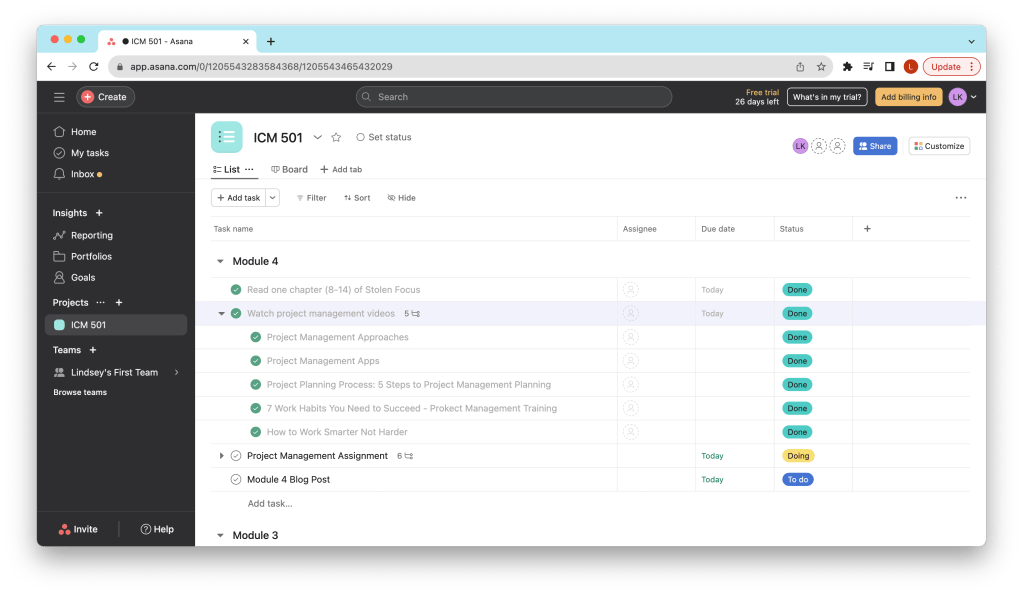
When I first made my Asana account, it took me a little while to understand the platform and how to best use it to optimize my workflow. Since I was making the project management system for the entire ICM501 course, I liked that I could split my to-do list into different sections, or in this case, modules (seen below).

I also really liked that I could break down larger tasks into smaller sub-tasks. For example, in Module Four, there were five project management videos to watch. Instead of just writing “Watch project management videos” on the to-do list and checking it off once I watched all of them, I could make a task – “watch project management videos” – and then break it down into sub-tasks – “Project Management Approaches,” “Project Management Apps,” etc.
While I’ve only used it for a few days now, I can confidently say that Asana is a great project management application. The ability to sort tasks by any criteria, the flexibility to view a list in any format, and the validation provided when a task is completed are all positive attributes of the platform.
Regardless of the platform I use – Asana, spreadsheets, or maybe something new – the skills I develop at this stage in my life will benefit me as a graduate student and beyond.
 Lindsey Komson
Leave a comment