When making a content strategy, it’s important to organize all your thoughts. There’s so much to keep track of, but how do you do it?
The simple answer: a content ecosystem.
Why do you need to keep all of these ideas organized? Well, according tScott Kubie, Lead Content Strategist at Brain Traffic, this “helps executives and business leaders understand just how vast their content ecosystem really is.” Whether you’re an executive or an entry-level employee, keeping all your content organized will set you up for success no matter what your position is. “Use the ecosystem…as something to look at to keep the attention of stakeholders and focus conversation to things like wireframes and visual designs,” Kubie writes.
There are 4 key parts to keeping a content ecosystem:
- Prioritization
- Organization
- Content Model
- Presentation
Let’s look through each part and how to keep track of the information necessary to implement a content strategy.
Prioritization
The first step in creating documents for your content ecosystem is prioritizing. You can’t put together any meaningful work if you don’t have your priorities straight!
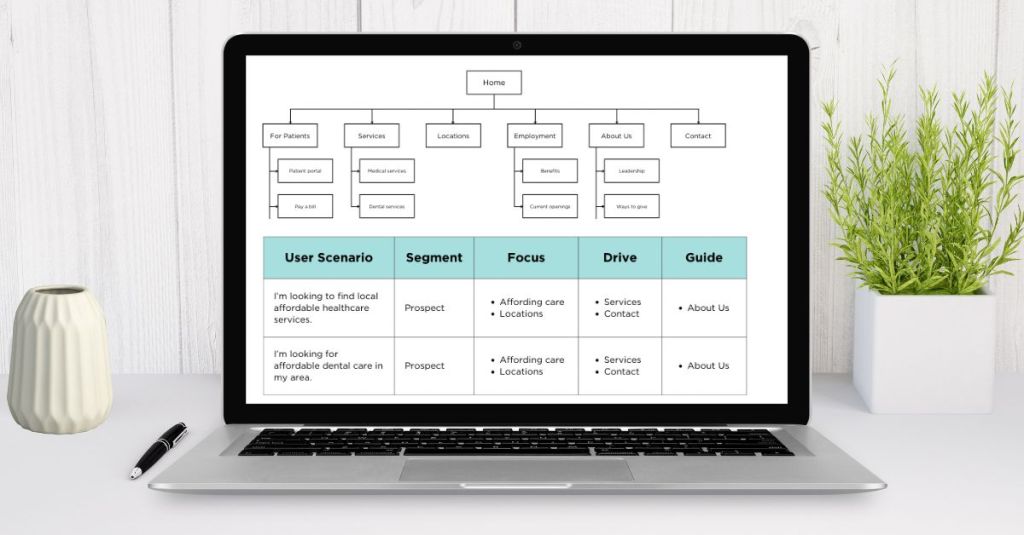
An effective way to keep track of priorities for both the business and the consumer is by creating a prioritization table. A prioritization table helps businesses identify content that exists for themselves and their consumers.
There are 5 areas of these tables: User Scenario, Segment, Focus, Drive, and Guide.
User Scenario details a circumstance in which a user would want or need to go to your website. Segment categorizes these users into prospects, new customers, and loyal customers. Focus, Drive, and Guide detail certain pages that these users can arrive that. Whether it’s the necessary information for users to focus on, the information the business wants to drive consumers toward, or the resources they can guide consumers to, every page has a different reason for existing on the website.
Organization
Personally, I think the best and most visually appealing way to organize a website’s content is by creating a sitemap. A sitemap can be considered a very, very high level blueprint of a website.
Creating a sitemap allows key stakeholders to see an overall framework of the website and understand what content can be grouped together. This diagram helps develop a positive user experience, as it organizes content in a way that users would find beneficial.
Ashley Crutcher, UX Designer at Intervarsity, explains that sitemaps are “fairly self-explanatory. Usually, they’re a top-down diagram of the hierarchy of your site.” This is a great explanation, as the sitemap is broken down into the homepage, core pages, and core lists. Speaking of those categories, that takes us perfectly to the next part.
Content model
I believe that a content model is one of the most important resources you can create when building a website. This document keeps track of all your business goals and how each one of the pages aligns with those goals. This is so important because why put all this work into pages for a website if they don’t align with the business’ goals?
A content model matrix helps businesses structure and differentiate their content across pages. By outlining business goals, you can align certain pages and/or lists to certain goals the business is trying to achieve. This is also helpful in differentiating the types of content on each page, making sure there isn’t much repetition between lists and/or pages.
Presentation
Lastly, wireframes are the closest you’ll get to a model of your final site without going through the entire design and development process. These are essential in making sure the content you’ve organized and deemed important is showcased in an effective way before handing the project off to designers.
Webflow writer Jeff Cardello uses the analogy “if a sitemap provides the blueprint for your whole website, a wireframe represents the blueprint for a single page (or group of pages)… Wireframes communicate the structure of a website in a visual way that everyone can understand. Something like a state change can be complex to describe to someone unfamiliar with design, but a wireframe can clarify that with a simple visual or two.”
Wireframes fit into this workflow because they feed directly from the content strategy. Creating a blueprint for a website using the documents we’ve created makes the process so much easier for the designers and the entire team.
Wondering how this all fits together? Cardello puts it simply, “A sitemap and wireframes lay the foundation to build a website on. When you’ve prepared and put thought into the site goals, architecture, and UX it makes for a purpose-driven process. When the path to success has been cleared of obstructions, it makes for a quicker journey.”
By taking all these steps, you can develop a clearer content strategy and an effective website for both your business and its consumers.
 Lindsey Komson
Leave a comment